
Stop Cloning Your Tax Workflow: How Conditional Branching Replaces Duplicate Templates
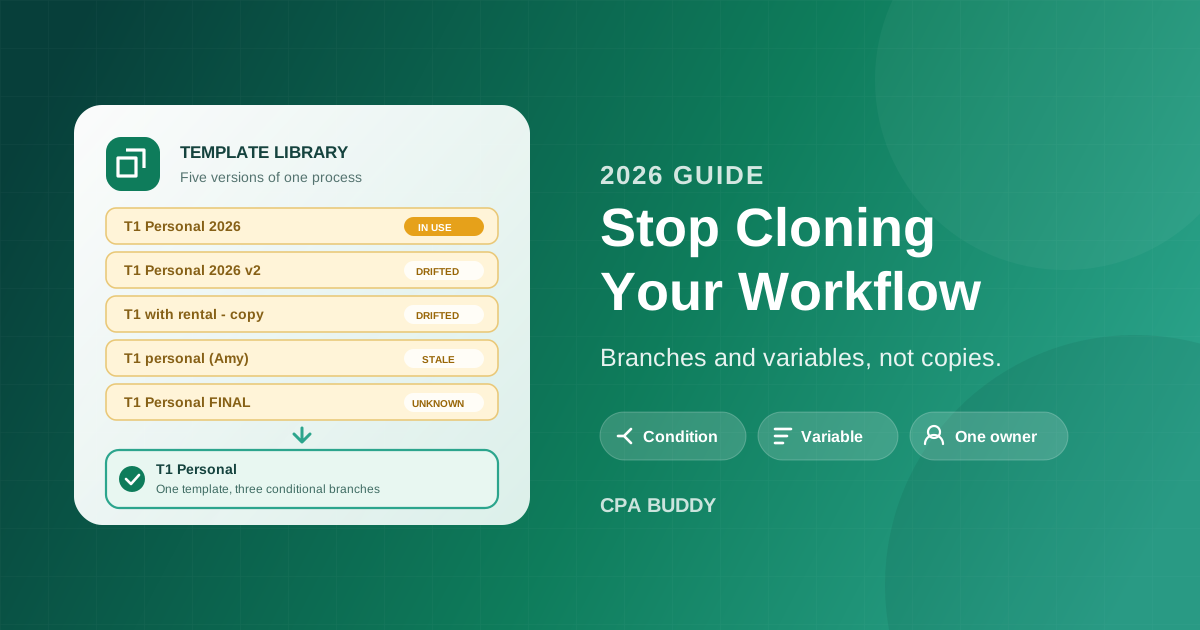
Open your template library and count. Most accounting firms that have run workflow software for more than a year find somewhere between six and twenty templates, and several of them describe the same process. There is a personal tax template. Beside it is a personal tax template with a slightly different name. Beside those are two copies from last spring, kept because somebody needed one step changed and did not want to touch the original, and a fifth nobody will admit to creating. Every one of those tax workflow templates was made for a sensible reason by somebody who was busy. Together they mean the firm no longer has one personal tax process. It has five, they disagree with each other, and nobody can say which one is right.
- Nobody plans template sprawl. It accumulates one reasonable copy at a time, and the cost only appears when the copies disagree.
- The test is whether you have a different path through one process or genuinely a different process. Only the second earns its own template.
- If the only difference between two templates is a name, a date, or an assignee, that is a variable rather than a template.
- Every template needs a named owner and a short change note, or the library grows back within a year.
Nobody Decides to Keep Five Versions of One Process
Template sprawl is never a decision. It is an accumulation, and in an accounting firm it happens in three recognizable moments.
The client who is slightly different
One client has a rental property, or a second jurisdiction, or an extra approval the others do not need. Copying the template is faster than thinking about how to fit the difference into it.
The year that changed
A form changes, a threshold moves, a deadline shifts. Rather than edit a template with work already running against it, somebody makes next year a fresh copy and leaves the old one in place.
The person who could not edit
A preparer needs one step added, is not sure whether editing will disturb live client work, and takes the safe route. A private copy with their name on it, used only by them.
Each of those is a rational act in the moment. The problem is that none of them is ever undone. The copy outlives the reason it was made, and nobody is willing to delete a template in case somebody is still using it. Twelve months later the library is a record of every exception the firm has ever encountered, with no indication of which entry represents current practice.
The Cost Is Drift, Not Clutter
A cluttered template list looks like an aesthetic problem. It is not. Clutter is cosmetic and drift is operational, and the copies always drift.
Picture a firm with five versions of its personal tax workflow. In February somebody realizes the document request is missing an item and adds it. They add it to the version they happen to be working in. The other four still request an incomplete set of documents, and nothing anywhere flags the discrepancy. In March a preparer improves the wording of the client approval email in a different copy. In April a deadline changes and gets updated in two of the five.
By the end of the season no version of the process is correct. Each holds two or three improvements the others lack. The firm does not have one process with a known standard. It has five partial processes, and which one a client receives depends on which template a preparer happened to open. That is the same failure as running the firm on memory, except now it is written down five times in five different ways, which is arguably worse. At least tribal knowledge lives in one head with one version of the truth.
Ask two preparers to open the template they would use for a straightforward personal return, then compare the two side by side. Most firms find between three and eight differences they cannot account for, and cannot say which side of each difference is correct. If nobody can answer that in under a minute, the firm does not currently have a defined process for its highest-volume service.
Drift also quietly undoes the reason you bought workflow software. The value of a standard process is that improvements compound: fix something once, and every client benefits from then on. Split the process across copies and improvements stop compounding. Each fix lands in one place, benefits a fraction of clients, and has to be rediscovered by somebody else later.
Different Path, or Different Process?
Here is the test that resolves almost every case. Look at the steps before the difference and the steps after it. If both variations start the same way and finish the same way, and diverge only in the middle, you have one process with a branch. If they differ in who does the work, what gets collected, when it is due, and how it is reviewed, the shared portion is too small to force together.
Choose a separate template if…
- The engagement has its own filing deadline and its own compliance calendar, such as a personal return against a corporate return.
- The document set barely overlaps, so the collection step would be almost entirely inside the branch anyway.
- A different role owns the work end to end, not merely one step in the middle.
- The review standard differs, because a compilation and a tax return are not reviewed against the same requirements.
- The branch would need to cover more than about half the steps in the template.
Choose one template with a branch if…
- The opening steps are identical: same engagement setup, same kickoff, same document request with a few conditional additions.
- The closing steps are identical: same review route, same client approval, same filing and delivery.
- The difference is a handful of extra steps or skipped steps in the middle.
- The variation is predictable from data you already hold, such as client type or service scope.
- You would otherwise maintain the same improvement in two places forever.
A useful rule of thumb: if you would have to make the same change to both templates every time the process improves, they are one process and should be one template.
That last line is the whole argument compressed. Two templates that always change together are one template wearing a disguise.
Where the Branch Actually Goes
Conditional branching sounds abstract until you see the four places small firms actually need it. A condition node in a visual workflow designer tests something the system already knows and sends the work down the matching path, which is what makes a branch more reliable than a decision a preparer has to remember to make.
Client type
Whether the client record is an individual, business, trust, estate, or non-profit.
Which documents are requested, which schedules appear as preparation tasks, and which signatory receives the approval request.
The kickoff, the collection mechanism, the review route, and the delivery steps are identical. Only the middle differs, and the client type is already on the record.
Service scope inside a return
Whether this engagement includes rental income, self-employment, investment disposals, or foreign reporting.
A block of extra document requests and preparation tasks switches on. Everything else runs unchanged.
This is the most cloned variation in most firms and the least deserving of a template. It is additive: the same process with three more steps in it.
Review tier
Whether the file is routine recurring work, a standard file, or one needing partner judgment.
Where the completed work routes, and whether an approval gate is required before delivery.
Routing work to different reviewers is exactly what a condition is for. Cloning the template to change one assignee is how firms end up unable to see the whole review queue.
Jurisdiction
Which province, state, or tax authority applies to the engagement.
Deadline dates, the wording of client-facing steps, and any jurisdiction-specific filing tasks.
The shape of the work does not change across jurisdictions. The dates and the labels change, and both are far better handled as conditions and variables than as parallel templates.
The first two rows account for most of the copies sitting in a typical library. Client type is already recorded on the client record as an individual, business, trust, estate, or non-profit, so a condition can read it rather than asking anybody to choose correctly under time pressure.
The review tier row is worth pausing on, because it connects to a more expensive problem. When a firm clones a template to send one group of files to a different reviewer, the review queue splits along with it, and a queue nobody can see whole is the mechanism behind work sitting in partner review for days. One template with a routing condition keeps the queue in one place.
If the Only Difference Is a Name, It Is a Variable
The second half of this work has nothing to do with branching. A surprising share of duplicate workflow templates exist only because somebody needed different text in an email, and the way to get different text seemed to be a different template.
It is not. Anything that varies per client but does not change the shape of the process belongs in a variable, filled in at the moment you assign the template. Variables like {{client_name}} and {{firm_name}} are substituted when the workflow is assigned, so one template produces correctly personalized output for every client. The same applies to due dates derived from the engagement, to the staff member assigned to a step, and to the fee quoted in a client-facing message. It applies equally to the email templates a workflow sends, where one template carrying variables replaces six near-identical drafts that differ by a salutation.
Before you build anything, list what actually differs between your copies and label each item. Variable if it is a name, date, amount, or assignee. Branch if it is a step that should exist for some clients and not others. Genuine exception if it is neither, which is rarer than it feels. Most firms find that eight of ten differences are variables, one is a branch, and the remainder does not survive being written down.
That third bucket deserves suspicion. A difference that is neither a variable nor a predictable branch is usually one of two things: a habit nobody has examined, or a client-specific accommodation the firm agreed to years ago and never revisited. Both are worth a conversation before they are worth a template.
Collapsing the Library You Already Have
Consolidation goes wrong when a firm tries to design the perfect template from scratch in August and roll it out in February. Work from what you have instead.
Inventory the library and name an owner for each entry
List every template, when it was last edited, and who uses it. The templates nobody can name a user for are your first answer, and they are usually a third of the list.
Pick the canonical version by use, not by date
Choose the copy most of the work actually runs through, even if another looks tidier or newer. Consolidating onto the version people already use removes most of the retraining.
Write down the real differences
Compare each copy against the canonical one and list what actually differs. This is the step firms skip and the step that changes minds, because the list is nearly always shorter than everyone expected.
Label each difference as variable, branch, or exception
Use the three buckets above. The variables cost you nothing to absorb. The branches are the design work. The exceptions need a decision from a partner rather than a configuration change.
Build the branches on the canonical template and test on one client
Add the conditions, then assign the result to a single real engagement and walk it through end to end. One live test surfaces more than an hour of reading the canvas.
Archive the copies and migrate only new work
Leave engagements already running on the old copies alone and point every new assignment at the consolidated template. Archive rather than delete, so the audit trail of what a client received last year stays intact.
The last point is the one that makes consolidation survivable during a busy period. You are not migrating work in flight. You are changing what the next assignment picks up, which means the change can happen in the middle of a season without disrupting anything already moving.
Editing Without Breaking Work in Flight
The most common reason staff clone a template is fear of editing a live one, so it is worth being precise about why that fear is misplaced.
A template is a blueprint. An instance is a running copy of that blueprint attached to one client. When you assign a template, each node becomes a concrete step in that client’s instance, with its own status, and the instance stops depending on the template from then on. Editing the firm template changes what future assignments look like. It does not reach into the ninety instances already running.
That separation supports the reverse move as well. When one client genuinely needs a step the others do not, you can adjust that client’s live instance without touching the template or any other client. This is the case the private copy was invented for, and it does not require a copy at all.
Platform templates are starting points you copy once into your firm and then own. Firm templates are the version of record for how your practice does the work, and they are the tier that should be edited and improved. Client instances are individual runs, and they are the right place for a one-off accommodation. Sprawl happens when firms make copies at the firm tier to handle things the instance tier already handles.
The Governance That Stops It Growing Back
Consolidation is a weekend. Staying consolidated is a habit, and it needs four small rules that cost nothing.
- One named owner per template. Not a committee. One person who approves changes to how the firm performs that service.
- A naming convention with no room for copies. Service and scope only, such as Personal Tax or Monthly Bookkeeping. No names, no version numbers, no dates. A convention with no space for
v2makes a second version awkward to justify, which is the point. - A one-line change note. What changed, when, and why. This is what lets you answer why a step exists two seasons later, and it is the difference between a process and a pile of accumulated preferences.
- Cloning requires a stated reason. Not a prohibition, a question. Anyone may copy a template, provided they can say in a sentence why the difference is a separate process rather than a branch or a variable. Most proposed copies do not survive the sentence.
Those rules work best where the process already lives, alongside the engagement records and tasks the workflow generates, so ownership of the template sits next to ownership of the work it produces. If the inventory turns up the opposite problem — a service you deliver every month with no template behind it at all — the ranked list of workflows to automate first is the better place to start.
A Template Health Check
Before your next filing season, confirm that:
- You can state how many templates the firm has, and name the service each one delivers.
- No two templates describe the same process with different names.
- Every template has one named owner who approves changes to it.
- Each variation inside a service is handled by a condition, not by a copy.
- No template contains hard-coded client names, dates, or assignees that should be variables.
- Staff know they can edit a template without disturbing client work already running.
- Templates that are no longer used are archived rather than left in the list.
- Somebody can point to the change note explaining the most recent edit to your highest-volume template.
If most of those are true, the next improvement you make to your busiest process will reach every client who needs it. That is the entire return on doing this, and it is larger than it sounds, because it applies to every improvement you make from then on.
Five templates for one process is not a sign of a thorough firm. It is a sign that the firm has answered the same question five times and cannot remember which answer it settled on. Run the test on your busiest service this week: open the copies, list what genuinely differs, and sort each difference into a variable, a branch, or a real exception. Most of the list will collapse. CPA Buddy is built for the version that survives — a visual designer with conditional branching so one template carries every path, a three-tier hierarchy that separates the blueprint from each client’s running instance, and progress tracking that shows where every engagement stands without anyone asking which template it came from.
Frequently Asked Questions
Should I create separate workflow templates for T1 and T2 returns?
Usually yes. A personal return and a corporate return request different documents, run against different filing deadlines, involve different preparation steps, and are often reviewed to a different standard. That is a different process, not a different path through the same one, so it earns its own template. The templates to collapse are the near-duplicates of a single process — the four slightly different versions of your personal tax workflow, not the personal and corporate workflows sitting beside each other.
How many workflow templates should a small accounting firm have?
Roughly one per distinct service you deliver, not one per client or per variation. A firm offering personal tax, corporate tax, monthly bookkeeping, sales tax filings, and onboarding needs about five well-built templates, each carrying branches for the variations inside it. If your library has grown past the number of services you actually sell, the extra templates are almost always copies of one another rather than genuinely different processes.
What is the difference between a workflow template and a workflow instance?
A template is the blueprint — the steps, their sequence, the conditions and the timing. An instance is what runs for one specific client after you assign that template to them. In CPA Buddy each node in the template becomes a concrete step in the instance with its own status, and instances are independent of one another, so one client's running workflow can be adjusted without touching anyone else's.
Can I change a workflow template while client work is in progress?
Yes, and this matters because inability to edit safely is the single most common reason staff clone a template instead. Templates and running instances are separate in CPA Buddy. You can edit a firm template for future assignments, or adjust one client's live workflow mid-engagement, without disturbing the other instances already in flight.
How do I decide between adding a condition and creating a new template?
Ask whether the steps before and after the difference are the same. If two variations share their opening steps, their document requests, and their review and delivery steps, and diverge only in the middle, that is one process with a branch and a condition node handles it. If the variations differ in who does the work, what gets collected, when it is due, and how it is reviewed, the shared portion is too small to be worth forcing together and a separate template is the honest answer.
Related Articles
Ready to streamline your practice?
Join accounting firms across North America using CPA Buddy to transform their practice management.