
Is It Safe to Use AI with Client Data? A Guide for Accounting Firms
Here is how it actually happens. A practitioner is three hours into a corporate file, an account will not tie out, and there is a chatbot open in the next tab. They paste in the trial balance and ask what looks wrong. The answer is genuinely useful and the whole thing takes four seconds. Nothing visibly bad follows — no breach notice, no complaint, no regulator. That is precisely the problem: with AI and client data, the moment of risk produces no feedback at all. This guide is about closing that gap without pretending the sensible answer is to ban the technology.
- The useful question is not whether AI is safe — it is where a specific tool sends your data, who can read it, and whether you can show afterwards what was disclosed.
- Your existing confidentiality obligations already cover AI. Nothing new was needed to make an unconsidered disclosure a problem.
- General-purpose assistants are fine for work with no client identifiers in it; anything naming a real client belongs inside systems your firm controls.
- An assistant that ignores your role-based permissions is a disclosure risk inside your own firm, not just outside it.
Stop Asking Whether AI Is Safe
“Is AI safe for client data” cannot be answered, because AI is not one thing. A model summarizing a published CRA guidance page and a model receiving a client’s unredacted T4 slips present entirely different problems, and the difference has nothing to do with the model. It has to do with where the data went.
So replace the unanswerable question with four that have actual answers. Where is this information processed and stored? Who or what can access it once it arrives? How long is it kept? And if a client asked next year what had been disclosed about them, could you answer with a record rather than a recollection?
Those four questions produce three meaningfully different situations, and most firms are in one of them without having decided to be:
A consumer chatbot
Whatever is pasted has left the firm and gone to a third party on terms nobody at the firm negotiated. There is no record of what was disclosed, and no engagement covering it.
A business AI subscription
Usually stronger controls and a real agreement. But it is still a new processor holding client data, and one your security plan and engagement letters may not mention yet.
AI inside your system of record
The assistant queries information already governed by your firm's access rules, retention, and audit trail. Nothing crosses a new boundary because the data does not move.
None of the three is automatically wrong, and the first one has legitimate uses. The failure mode is not using the wrong category — it is not knowing which category you are in, which is where most firms are today because the decision was never made at the firm level. It got made one paste at a time by whoever had a deadline.
The Obligations You Already Have
A common assumption is that AI sits in a regulatory gap waiting for someone to write rules. It does not. Confidentiality duties are written to cover disclosure to third parties generally, which means they landed on AI the moment the first tab was opened.
United States firms
Internal Revenue Code section 7216 restricts a tax return preparer from knowingly or recklessly disclosing or using information furnished in connection with preparing a return, with limited exceptions and consent requirements, and it carries criminal penalties. Section 6713 adds a civil penalty for the same conduct. Nothing in either provision cares whether the recipient of a disclosure is a human contractor or a software service — which is the point worth sitting with, because pasting return information into an outside tool is plausibly a disclosure.
Separately, the FTC Safeguards Rule requires tax and accounting professionals to maintain a written information security plan. IRS Publication 4557 covers the safeguarding obligation and Publication 5708 provides a template. If your firm has a written plan, the practical question is simple: does it name the AI tools your staff are using? For most firms the honest answer is no, and that is a documentation gap rather than a technology problem.
Canadian firms
The provincial and regional rules of professional conduct impose confidentiality obligations on CPAs that apply to information disclosed to any third party. PIPEDA governs personal information handled in the course of commercial activity, and it carries a transparency expectation that is easy to overlook here: where personal information may be transferred to a service provider outside Canada, clients should be able to find that out, because the information becomes subject to the laws of that jurisdiction. An AI tool processing client information in another country is a cross-border transfer even though it never feels like one.
Cross-border transparency
Processing client information abroad is a transfer clients should be able to learn about, even when it happens inside a chat window.
Professional confidentiality
Your provincial code applies to a disclosure to a software service exactly as it applies to any other third party.
Choose your region
CPA Buddy offers data residency in the USA and Canada, so firms can keep client information in the jurisdiction they require.
Confidentiality and privacy requirements turn on your jurisdiction, your engagements, and your own facts. Treat the references above as a starting point for a conversation with your professional body, your legal counsel, and your insurer — not as a determination about your firm.
What Belongs Outside, and What Does Not
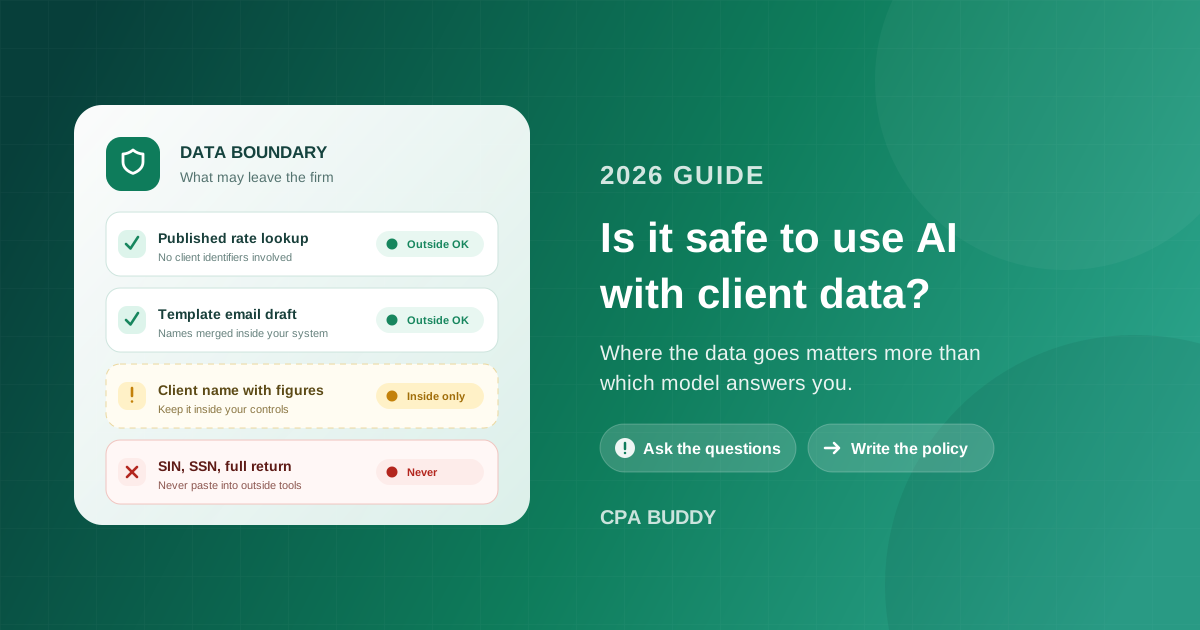
The practical rule is easier than the regulatory picture suggests, and it turns on one distinction: whether the request contains client identifiers at all.
Choose a general-purpose assistant if…
- Researching a published rate, threshold, or filing deadline you will verify at the source
- Drafting reusable template wording with placeholders instead of real names
- Working out a spreadsheet formula or explaining an error message
- Summarizing public guidance, or tightening prose you wrote yourself
- Anything where you could publish the entire prompt without a confidentiality concern
Choose an assistant inside your practice system if…
- Any question that names a real client, entity, or engagement
- Deadline, status, and assignment questions about live work
- Anything touching stored documents or source records
- Drafting client communications from real engagement details
- Anything you would need to evidence later during a review
The dividing line is not sensitivity in the abstract — it is whether the request can be answered without client identifiers. If it cannot, it belongs in a system already covered by your firm's access controls and audit trail.
Which makes the never-list short and worth posting somewhere staff will see it. Keep the following out of any tool outside your own systems:
- Social Insurance numbers, Social Security numbers, and taxpayer identification numbers.
- Complete returns, trial balances, and general ledger extracts.
- Banking details, payment credentials, and void cheques.
- Unredacted source documents, including slips, statements, and identification.
- Any client or entity name paired with financial specifics.
- Portal logins, authorization codes, and representative access credentials.
- Staff compensation, performance, and HR records, which deserve the same protection as client data.
Deleting the name is not the same as removing the identity. A “generic” set of figures that keeps a distinctive revenue number, a city, an industry, and an unusual fiscal year-end can often be traced back to one company by anyone who knows the local market. Redaction lowers risk; it does not convert a disclosure into a non-disclosure.
Nine Questions to Ask Any AI Vendor
Including us. These are the questions that separate a vendor who has thought about accounting confidentiality from one who has thought about demos, and a vendor who cannot answer them in writing has told you something useful.
Where is our data processed and stored?
Ask for the country, not the marketing region. This is the answer your Canadian clients and your PIPEDA transparency obligation depend on.
Is our content used to train or improve models?
Ask whether the answer differs by plan tier, and get it in the agreement rather than in a support reply or a blog post.
Which subprocessors or model providers can access it?
Most AI features are built on third-party models. You are entitled to know who sits behind the interface and under what terms.
How long are prompts and outputs retained?
Retention is where a one-second query becomes a stored record. Ask what the period is and whether you can shorten or delete it.
Does the assistant enforce our own role permissions?
An assistant that answers anything to anyone has quietly removed every internal access control your firm configured.
Is there an audit trail of what the assistant accessed?
If you cannot reconstruct what was retrieved and by whom, you cannot answer a client question or survive a review on the point.
Can we restrict or disable it per user or per role?
Firms adopt at different speeds. You want the ability to pilot with two people before the whole team has access.
Is a data processing agreement available, and does it name AI processing?
An agreement written before the AI feature existed may not actually cover it. Read for the specific mention.
What happens to our data if we cancel?
Deletion timelines and export formats matter most at the moment you have the least leverage to negotiate them.
The Risk Inside Your Own Firm
Almost every discussion of AI confidentiality points outward, at the vendor. The more likely incident points inward.
Consider an assistant connected to your practice data with no notion of who is asking. A first-year staff member types “what is everyone’s salary” or “show me the partner’s personal file,” and it answers, helpfully and instantly, because nobody told it not to. No external party was involved and no data left the building, but you have a confidentiality failure that is harder to explain to your team than an outside breach would be.
The correct behaviour is that the assistant can only reach what the person asking could already reach on their own. It should widen how fast someone gets an answer, never what they are entitled to see.
This is where the boring groundwork pays off. If your firm has real roles configured — team management in CPA Buddy provides owner, admin, manager, staff, and contractor with role-based permissions — then an assistant that respects those roles inherits a sensible boundary automatically. If everyone at your firm shares one effective level of access, no AI tool can invent the distinction for you. That is the same argument as documenting your firm before your first hire, arriving from a different direction: the structure has to exist before software can enforce it.
Write the Policy Down
A firm-wide understanding that lives only in conversation is not a policy, and during the third week of tax season it will lose to whatever is faster. Written, this takes an hour:
Name the approved tools
A short, specific list of what staff may use for firm work, and an explicit statement that anything not listed needs approval first. Ambiguity resolves in favour of convenience.
Define what may go where
Two or three categories are enough: public and general information, internal firm information, and client-identifying information. Map each category to the tools allowed to receive it.
Require human review before anything ships
No AI-assisted output reaches a client, a filing, or a working paper without a person who is accountable for it having read it. Assistance never transfers professional responsibility.
Name one owner
One person maintains the approved list, evaluates requests, and keeps the AI section of your written security plan current. A policy owned by everyone is maintained by nobody.
Cover it during onboarding
New staff arrive with habits formed somewhere else. Ten minutes in week one is cheaper than discovering the habit during a review.
Review on a fixed schedule
Tools change terms, plans change tiers, and staff find new products. Quarterly is enough; never is how a policy becomes inaccurate without anyone noticing.
Worth adding while you are in there: your engagement letters and privacy notice were probably written before any of this, and are worth a read with AI in mind.
Where CPA Buddy Fits
We are not going to tell you our platform answers all nine questions above so you can skip asking. Ask us, in writing, and hold every vendor to the same standard — including us.
What we can point at is what the platform does today. The AI assistant enforces the same role-based permissions as the rest of the system, so a user can only query data they are already authorized to see, and it is available to authenticated staff across plans. On the platform side, security and compliance covers a firm-wide audit trail recording who did what and when, role-based access controls, a recycle bin with retention windows, and data residency in the USA and Canada. Data is encrypted in transit and at rest. Document management keeps client files inside the platform with versioning and expiring share links rather than in email threads.
The structural argument matters more than the feature list, though. An assistant operating inside your practice management system is asking questions about data that is already yours, already governed, and already logged — which is a different proposition from moving that data somewhere else to get an answer. That is also the practical case for cloud practice management and for the broader shift described in how AI is transforming practice management: consolidation is what makes the confidentiality question tractable in the first place.
A Confidentiality Checklist Before You Expand AI Use
Before more staff start using more tools, confirm that:
- Your written information security plan names every AI tool in use at the firm.
- Every tool holding client data has an agreement that covers AI processing specifically.
- You know the processing location for each tool, and it matches what your clients were told.
- Retention periods for prompts and outputs are known and acceptable.
- Any assistant touching firm data enforces your role-based permissions.
- You can reconstruct what an assistant accessed, and on whose behalf.
- Staff know, without having to guess, which categories of information may go to which tool.
- Human review is required before AI-assisted work reaches a client or a filing.
- One named person owns the policy and reviews it on a fixed schedule.
The Honest Summary
AI is not the confidentiality threat it is often framed as, and it is not the non-issue that convenience makes it feel like. It is a new place client data can go, which means it needs the same treatment as every other place client data can go: a decision about which tools are approved, a boundary around what may leave your systems, a permission model that holds inside the firm, and a record you can point to afterwards.
Firms that do this get to use the technology properly, because they stopped relying on individual judgment under deadline pressure. Firms that do not are already using it — just without knowing where the data went.
The question was never whether to allow AI at your firm. Your staff answered it already, probably months ago, one useful shortcut at a time. What is still open is whether that use happens inside a boundary you chose. Write down the approved tools, draw the line at client identifiers, make sure any assistant touching firm data respects the roles you configured, and put AI into the security plan you already maintain. Then use it hard. CPA Buddy keeps clients, documents, deadlines, and communication in one platform with role-based access, a firm-wide audit trail, and data residency in the USA and Canada — so the assistant works on data that never had to leave your firm to be useful.
Frequently Asked Questions
Can accountants use AI with client data?
Yes, but the decision depends on where the data is processed rather than on AI in general. Before entering client information into any tool, confirm where it is stored, whether it may be retained or used to improve the service, who can access it, and whether you can later show what was disclosed. Client information generally belongs in systems your firm already controls under an agreement that covers confidentiality.
Is it safe to put client information into ChatGPT or a similar general-purpose assistant?
Treat any general-purpose assistant as a third party outside your firm. Consumer and business tiers of the same product often differ in how content may be retained or used, so review the terms of the specific tier your firm is on instead of relying on the product's general reputation. Use these tools for work that involves no client identifiers, such as researching a published rule or drafting template wording.
What client information should never be entered into an outside AI tool?
Keep out Social Insurance and Social Security numbers, taxpayer identification numbers, complete returns, trial balances, banking and payment details, unredacted source documents, portal or authorization credentials, and any client or entity name paired with financial specifics. Staff compensation and HR records deserve the same treatment.
Does removing the client name make it safe to paste financial data into AI?
Not reliably. A record stripped of its name can often still be re-identified when it retains distinctive figures, a city, an industry, a fiscal year-end, or an ownership structure. Redaction reduces risk but does not turn a disclosure into a non-disclosure, so it should not be treated as a substitute for a policy about which tools may receive client data.
What should an accounting firm's AI policy contain?
A workable policy names the tools staff are approved to use, defines which categories of information may go to each one, requires human review before AI-assisted work reaches a client or a filing, names one person accountable for maintaining the list, covers AI in staff onboarding, and is reviewed on a fixed schedule because tools and their terms change.
Why do role-based permissions matter for an AI assistant?
An assistant that answers questions without applying your existing access rules can expose information inside your own firm, such as compensation or unrelated client matters, to staff who are not authorized to see it. Any assistant working on firm data should enforce the same role-based permissions as the rest of the system and record what it accessed.
Related Articles
Ready to streamline your practice?
Join accounting firms across North America using CPA Buddy to transform their practice management.